All-in-One ★ Free to Start ⚡ Replace 5+ Apps

UGC Creator Tools

Stop juggling Canva, Google Drive, spreadsheets, and email templates. ReelPilot gives you the portfolio, AI brand detection, automated pitching, and analytics you need to run your UGC business — all in one place.

3,000+
Creators
6-in-1
Toolkit
Free
Core tools
AI
Powered
2 min
Setup
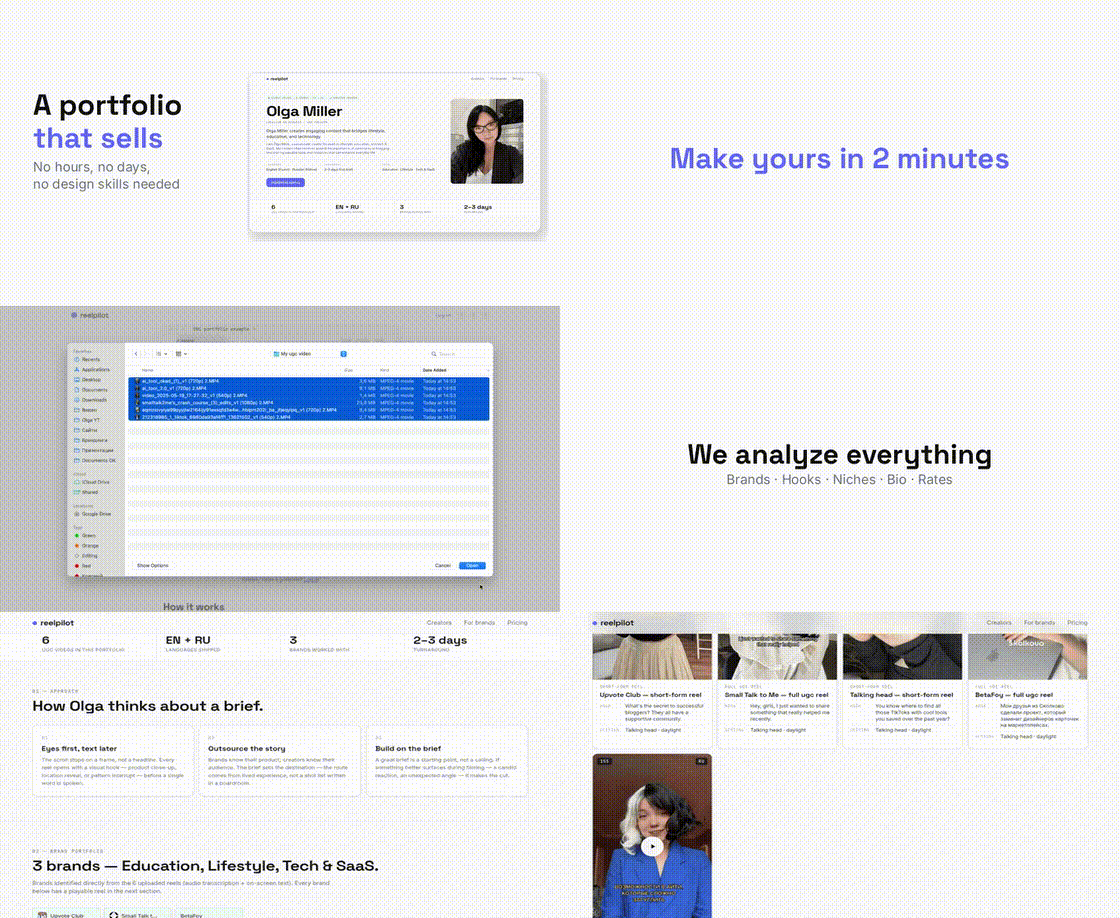
ReelPilot UGC creator toolkit demo — portfolio, pitching, and analytics in one place

Most Creators Use 5–7 Tools to Run Their Business

Editing apps, portfolio builders, CRMs, invoicing software, contract templates, analytics dashboards. Each one costs money, takes time to learn, and creates another login to manage.

Hours Wasted

Updating Canva decks, managing Drive folders, copying links between apps. Time you could spend creating content.

$50–$100/mo

Canva Pro, Notion, CRM subscriptions, invoicing tools. Costs add up before you even land your first deal.

Fragmented Data

Portfolio views in one app, pitch responses in another, invoices in a third. No single view of your business.

Every Tool a UGC Creator Needs — Built Into One Platform

ReelPilot replaces the scattered apps in your workflow with a single dashboard designed specifically for UGC creators.

01

Portfolio Builder

Upload your UGC videos and get a professional portfolio page in 2 minutes. AI detects brands, writes your bio, and generates case studies. One shareable link replaces Drive folders, Canva decks, and scattered files.

  • AI-generated bio and positioning
  • Native video playback on page
  • Auto-detected brands and hooks
  • Free to create and edit by hand
02

AI Brand Detection

Upload a video and AI watches it, reads on-screen text and audio, and identifies every brand you have worked with. No manual tagging. Brands are grouped by industry so clients find relevant work instantly.

  • Visual, text, and audio analysis
  • Brand logos and names extracted
  • Grouped by industry automatically
  • Works for small and local brands
03

AI Brand Pitching

Skip cold DMs. AI finds brands matching your niche and sends personalized pitches from your email. You review and approve before anything sends. Brands reply directly to you — not to a platform inbox.

  • Matches brands to your niche
  • Personalized pitch emails
  • You approve before sending
  • Direct replies to your inbox
04

Portfolio Analytics

See who viewed your portfolio, which videos they watched, how long they stayed, and which brands they clicked. Understand what content resonates with potential clients and optimize your page accordingly.

  • View count and unique visitors
  • Video play and watch time data
  • Brand click tracking
  • Optimize based on real data
05

Creator Directory

Your portfolio is automatically listed in the ReelPilot creator directory with 3,000+ creators. Brands search by niche, language, location, and rates to discover creators for their campaigns — including you.

  • Searchable by niche and language
  • Filterable by rates and location
  • Verified creator badges
  • Inbound leads from brands
06

Canvas Job Board

Browse 200+ UGC gigs posted daily, aggregated from across the internet. Includes curated programs with guaranteed payouts. Find work without cold pitching — brands come to you.

  • 200+ new gigs daily
  • Curated programs with payouts
  • Filter by niche and pay range
  • Apply directly from your portfolio

Set Up Your Toolkit in 3 Steps

No design skills needed. No complex onboarding. Upload your videos and everything else builds itself.

1

Upload Your Videos

Select your best UGC reels. MP4, MOV — any format. AI analyzes each video, detects brands, identifies hooks, and categorizes content type in under 30 seconds per video.

2

Review Your Portfolio

AI generates your bio, case studies, and creative approach. Edit anything by hand for free. Your portfolio page is live at reelpilot.co/c/your-name — ready to share.

3

Start Pitching and Getting Found

Share your link, browse the Canvas Job Board, or let AI pitch brands for you. Track who views your portfolio and which content gets the most attention.

ReelPilot vs. Separate Tools

Why pay for 5 apps when one platform does it all? Here is how ReelPilot stacks up against the scattered toolkit most creators cobble together.

CapabilityTypical Separate ToolsCostReelPilot
PortfolioCanva + Google Drive$0–$13/moBuilt in (free)
Brand detectionManual taggingYour timeAI-powered
Brand pitchingGmail + spreadsheet CRM$0–$30/moAI pitching
Portfolio analyticsLinktree Pro / Carrd$5–$24/moBuilt in
Creator directoryCollabstr / Billo profile$0 (platform takes cut)3,000+ creators
Job boardManual searchYour time200+ gigs/day
Setup time4–8 hours total2 minutes
Total monthly cost$30–$70+Free + credits

Tools That Work Alongside ReelPilot

ReelPilot handles portfolio, pitching, and discovery. Here are the best free tools for the rest of your UGC workflow.

Video Editing

CapCut (free) is the industry standard for short-form UGC editing. Captions, cuts, effects, and templates — everything you need on mobile or desktop.

  • Auto-captions and trending effects
  • Mobile and desktop versions
  • Export directly to your camera roll

Contracts

Google Docs (free) or HoneyBook ($16/mo) for contracts. Use templates covering deliverables, usage rights, payment terms, and revision policy.

  • Free contract templates online
  • E-signatures with HoneyBook or DocuSign
  • Always get usage rights in writing

Invoicing

Wave (free) or PayPal Business for invoicing. Send professional invoices, track payments, and manage your income — all at no cost.

  • Wave is 100% free for invoicing
  • PayPal for international payments
  • Automatic payment reminders
Read the Full Tools Comparison Guide →

What Creators Say About ReelPilot

Hear from UGC creators who consolidated their toolbox and simplified their workflow with ReelPilot.

★★★★★
"Love it literally. It creates this perfect portfolio for pitching to brands. I love the entire concept of this portfolio. Looking forward to see this site grow!"
Reet
Reet
Beauty & Lifestyle Creator
★★★★★
"The experience was pretty smooth. I loved the feature where AI described my videos. I am glad I hopped on this early."
Krittika
Krittika
Tech & SaaS UGC
★★★★★
"I never had an up-to-date portfolio. ReelPilot built in 2 minutes what I'd been putting off for months. Brands reply twice as often now."
C
Chris D.
UGC Creator
★★★★★
"I hated my Canva deck — had to re-layout every time I updated a video. ReelPilot organizes everything automatically. Brands keep finding my page and reaching out on their own."
N
Natalie
UGC Creator

Free Core Tools. AI Credits When You Need Them.

Build your portfolio, get listed in the directory, and browse the job board without paying a cent. AI-powered features use credits — starting at $0.15 each.

Free Forever

Portfolio builder, manual editing, shareable link, creator directory listing, Canvas Job Board access.

$0
No credit card required

AI Credits

Brand detection, bio regeneration, case study creation, AI pitching. Buy packs, no subscription.

$0.15 / credit
Credits never expire

Frequently Asked Questions

Everything you need to know about UGC creator tools and how ReelPilot fits into your workflow.

What tools do UGC creators need?
UGC creators need tools for video editing (CapCut), portfolio building (ReelPilot), brand pitching (email or AI pitching), invoicing (Wave or PayPal), contracts (Google Docs or HoneyBook), and analytics. Most creators use 5–7 separate apps. ReelPilot combines portfolio, AI brand detection, pitching, analytics, and a job board into one platform, so you only need an editing app and ReelPilot to run your business.
Is ReelPilot free for UGC creators?
Yes. Creating your portfolio, editing it by hand, sharing your link, getting listed in the creator directory, and browsing the Canvas Job Board are all free. AI-powered features like brand detection beyond 6 videos, bio regeneration, and automated pitching use credits starting at $0.15 each. No subscription required — credits never expire.
What is the best all-in-one tool for UGC creators?
ReelPilot is the only platform built specifically for UGC creators that combines portfolio building, AI brand detection, automated brand pitching, a creator directory with 3,000+ creators, a daily job board, and portfolio analytics in one place. Instead of paying for separate portfolio, CRM, and pitching tools, you get everything in one dashboard.
Do I need expensive software to start as a UGC creator?
No. You can launch your entire UGC business with free tools: CapCut for video editing, ReelPilot for portfolio and pitching, Google Docs for contracts, and Wave or PayPal for invoicing. Total cost: $0. As your business grows, you can add paid tools for scheduling, advanced editing, or project management.
How does ReelPilot compare to Canva for UGC portfolios?
Canva creates static image-based designs that you manually update every time you add new work. ReelPilot is built for video content: native video playback, AI-detected brands, auto-generated case studies, and built-in brand pitching. Upload a new video and your portfolio updates itself. Canva Pro costs $13/month; ReelPilot's portfolio is free.
Can ReelPilot replace my invoicing tool?
ReelPilot focuses on the front end of your business: portfolio, pitching, and discovery. For invoicing and payments, we recommend free tools like Wave, PayPal Business, or HoneyBook. ReelPilot helps you get clients; invoicing tools help you get paid. Together they cover the full workflow.
What analytics does ReelPilot provide?
ReelPilot shows who viewed your portfolio, which videos they watched, how long they spent on your page, and which brands they clicked. This data helps you understand what content resonates with potential clients and optimize your portfolio accordingly. You can see trends over time and identify which outreach efforts drive the most views.
How do UGC creator tools help me get more brand deals?
The right tools save you time on admin work so you can focus on creating content and pitching brands. A professional portfolio converts 3–5x better than a Google Drive link. AI-powered pitching reaches more brands than manual outreach. Analytics show you what is working so you can double down. And a job board puts opportunities in front of you daily.

Read the Complete Tools Guide

Want a detailed breakdown of every tool category with specific recommendations? Read our comprehensive comparison.

Tools Guide
Best UGC Creator Tools 2026: The Complete Comparison Guide
Every tool category compared: editing, portfolio, invoicing, contracts, analytics, and pitching. With specific recommendations and pricing.
Career
What Is a UGC Creator? The Complete Career Guide for 2026
UGC creator vs influencer, what brands actually pay for, and how to start with zero experience.
Outreach
How to Pitch Brands as a UGC Creator (Templates Inside)
Find the right contacts, write cold emails that get replies, follow up, and negotiate rates.

Build Your UGC Toolkit in 2 Minutes

Join 3,000+ creators who replaced scattered apps with one platform. Free to start, no credit card required.

Get Started Free →